
Sharing your journey
Adding stories
Section titled “Adding stories”The noforeignland map lets you share much more than just a red track line. Tap on your boat’s journey line (on the website) or press and hold it (in the app), then choose Add story.
Stories let you document your travels with photos, YouTube videos, and links to your own blog or website. Visitors can like and comment on your stories, helping you connect with other sailors and share your adventures.
Journey icons are added to your track indicating the type of content (images, text, video). Previews are shown in a scrolling area at the bottom of the screen. This journey has also been split into custom chapters showing the year and area sailed in:
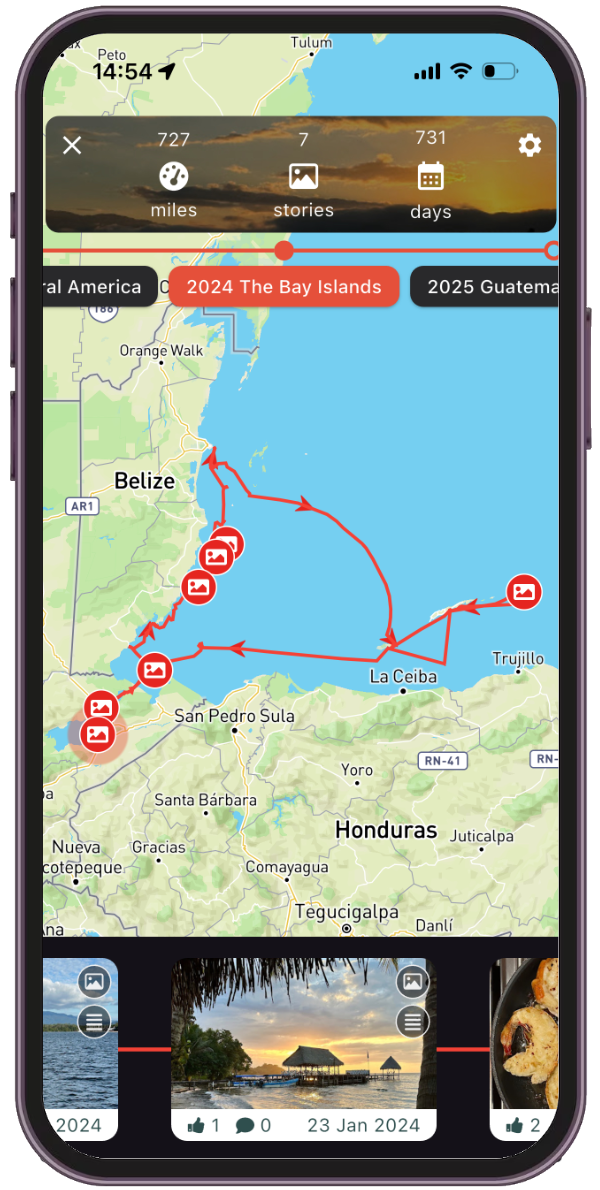
Example showing story icons, previews, and custom chapters on a journey.
Creating chapters
Section titled “Creating chapters”Over time, your journey might become difficult to view — perhaps you sail in the same area every year and your journey lines are crossing one another, or you’ve been circumnavigating and your track simply doesn’t fit on the screen anymore.
Chapters help solve this. By default, chapters are created for each year you’ve been sailing, but you can override this by defining your own. Your chapters might break your trip into seasons, highlight ocean passages, or even show individual excursions you’ve made.
When viewing your journey, tap on the settings button and choose Add chapter to start creating your own chapters.
This article explains how to add stories and define your own chapters:
Sharing your journey
Section titled “Sharing your journey”Every boat on noforeignland has its own dedicated link that takes you directly to its boat page.
To share your boat’s page, tap the Share button on your boat page to copy the link.
The link will open your boat page in our website, or in the app if installed.
Create a custom screenshot
Section titled “Create a custom screenshot”You can create customized images with views of your journey to embed in your personal blog articles, social media posts or presentations.
This article explains how: